> For the complete documentation index, see [llms.txt](https://docs.kiln.fi/v1/llms.txt). Markdown versions of documentation pages are available by appending `.md` to page URLs; this page is available as [Markdown](https://docs.kiln.fi/v1/integrations/wallets/stake-from-safe-wallet/using-kiln-dapp-deprecated.md).
# Using Kiln dApp (Deprecated)
Dedicated staking and EigenLayer Restaking using Kiln dApp in Safe{Wallet}
{% updates format="full" %}
{% update date="2026-04-23" %}
## dApp to Widget Migration
Kiln dApp is no longer available in Safe{Wallet}. Please use **Stake** inside Safe Wallet from the sidebar to access staking.
{% endupdate %}
{% endupdates %}
## ETH Staking via Kiln's Safe dApp
{% hint style="info" %}
Use this method for a permissionless experience and if you want to pay commissions automatically on-chain (using [Kiln On-chain](https://www.kiln.fi/kiln-on-chain)).
{% endhint %}
1. Access your Safe{Wallet} at .
2. Navigate to the ‘Apps’ in the left hand menu.
3. Search for ‘Kiln’.\
\
4. In the Kiln app, specify the amount of ETH you want to stake, and click “Stake”.
5. Confirm the transaction(s) within your Safe{Wallet}.
6. Once the transaction has been approved, your validators begin activating.
7. Monitor your validators’ progress and rewards in Kiln dApp at "*Dedicated > Validators*".
Follow the UI to stake in a few clicks. Here is a demo video:
{% embed url="" %}
***
## EigenLayer Restaking ETH + LST
### What is EigenLayer restaking?
Read more about EigenLayer and Kiln [here](broken://pages/fJlf7oBRVBNYsXPu8GyZ).
### Liquid Staking Token (LST) Restaking
Restaking of LSTs with EigenLayer is available via the Kiln dApp.
After this time, all LST deposits will again be paused.
### Native ETH Restaking
Restaking of native ETH will be available in the Kiln dApp at the end of February 2024.
### How to stake liquid staking tokens (LSTs)
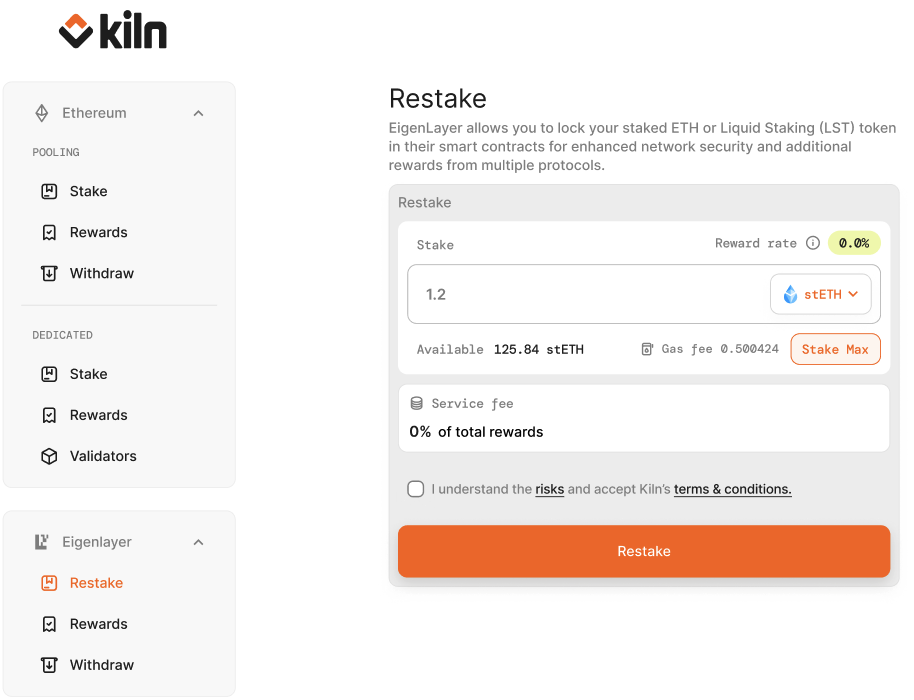
* In the Kiln dApp go to "*EigenLayer > Restake*".
* You can restake the following LSTs into EigenLayer pools via the Kiln dApp:
**`cbETH, osETH, ETHx, wBETH, stETH, rETH, ankrETH, oETH, swETH, mETH, sfrxETH.`**
* Choose the LST to restake, enter the amount, and click 'restake'.
* Approve the transaction(s)
### What are the fees for restaking?
Right now there are no fees for simply depositing and restaking your LST. You are free to withdraw at any time.
You still pay gas fees for the deposit and withdrawal transactions.
### What happens when I restake my LST via Kiln?
With Liquid Restaking, the LST tokens are transferred to EigenLayer smart contracts. The tokens are held in the smart contracts and you can [withdraw](#unstaking-and-withdrawals) at any time.
### How to view restaked positions
You can see an overview of all your restaked positions at "*EigenLayer > Portfolio*"
#### Restaking rewards
EigenLayer deposits will not yet receive any staking rewards. When EigenLayer is launched on mainnet (expected March / April 2024), users will have the ability to redelegate their LSTs to receive additional rewards.
#### Restaking points
By depositing your LST to the EigenLayer pools you will accumulate [restaking points](https://docs.eigenlayer.xyz/restaking-guides/restaking-user-guide/restaked-points), reflecting your contribution measured by the staked ETH amount over time.
### Unstaking and withdrawals
You can request to unstake your LSTs at any time.
All funds unstaked from EigenLayer go through a 7-day escrow period before being able to be withdrawn. After you initiate the withdrawal, you must wait 7-days before being able to withdraw your assets.
To unstake or withdraw, go to "*EigenLayer > Withdraw*" to initiate the unstake process.
***
## Staking via using Kiln Dashboard and WalletConnect
{% hint style="info" %}
Use this method if you are an existing Kiln B2B customer and are OK with being invoiced regularly.\
\
This experience is available on mainnet at and on testnet at .
{% endhint %}
To stake Ethereum held in a Safe multisig:
1. Go to Kiln dashboard, click stake -> ETH. When asked to connect wallet select wallet Connect.
2. Copy the URL from the wallet connect prompt that appears

3. Go to your Gnosis Safe apps screen with the wallet you want to stake with and select Wallet Connect
4. Paste the URL from the Kiln Dashboard in the Wallet Connect App on Gnosis Safe
5. After the wallet is connected return to Kiln Dashboard to select the amount to stake and initialize the transaction

6. Submit the transaction for it to be initialized in your workspace


7. Finally approve the transaction in your workspace with the required quorum for that account
### Stake via API
This is possible using Kiln Connect and the [Safe Transaction Service API](https://safe-transaction-mainnet.safe.global/). Get in touch for Kiln to guide you through how to do this.
---
# Agent Instructions
This documentation is published with GitBook. GitBook is the documentation platform designed so that both humans and AI agents can read, navigate, and reason over technical content effectively. Learn more at gitbook.com.
## Querying This Documentation
If you need additional information that is not directly available in this page, you can query the documentation by asking a question.
Perform an HTTP GET request on the following URL with the `ask` and `goal` query parameters:
```
GET https://docs.kiln.fi/v1/integrations/wallets/stake-from-safe-wallet/using-kiln-dapp-deprecated.md?ask=&goal=
```
`ask` is the immediate question: it should be specific, self-contained, and written in natural language.
`goal` is what the user is ultimately trying to achieve, the reason they need the answer. Sharing it helps GitBook give you a better, more relevant answer. A goal is most helpful when it describes the outcome the user wants rather than restating the question. For example, with `ask=how do I create an API token`, a goal like `automate deployments from our CI pipeline` lets GitBook tailor the answer to that use case.
The response will contain a direct answer to the question and relevant excerpts and sources from the documentation.
Use this mechanism when the answer is not explicitly present in the current page, you need clarification or additional context, or you want to retrieve related documentation sections.