# Avalanche (AVAX)

## Validators

{% hint style="info" %}
In order to stake AVAX, contact the customer team to setup a node&#x20;
{% endhint %}

{% tabs %}
{% tab title="Mainnet" %}
Nodes are spun up on demand
{% endtab %}
{% endtabs %}

## Overview&#x20;

<table><thead><tr><th width="354.5">Metric</th><th>Value</th></tr></thead><tbody><tr><td>Stake activation time</td><td>Instant</td></tr><tr><td>Stake lock-up time </td><td>Variable</td></tr><tr><td>Auto-compounding</td><td>No</td></tr><tr><td>Rewards frequency</td><td>After relevant cycle ends</td></tr><tr><td>Self-bond</td><td>Yes</td></tr><tr><td>Active set</td><td>2000 AVAX</td></tr><tr><td>Slashing</td><td>No automated slashing currently implemented in the protocol. </td></tr><tr><td>Relationship between validator stake balance and rewards</td><td>Linear. The more stake balance there is on the validator, the more rewards it will earn.</td></tr></tbody></table>

## Staking Workflow

<table data-header-hidden><thead><tr><th width="300">Parameter</th><th>Value</th></tr></thead><tbody><tr><td><strong>What is the staking process?</strong></td><td>In order to stake AVAX you need to initiate a validator staking transaction that will lock the funds for the selected time and act as self-bond. In order to initiate this transaction you need to enter a Node-ID which will be provided by Kiln.</td></tr><tr><td><strong>Can I keep staking/unstaking from/to the same wallet?</strong> </td><td><p>You can add additional delegations abiding the following:</p><ul><li>Available Delegator Capacity (max = 4x the validator stake, effective 5x total)</li><li>minimum 2 week that must end on or before validator stake ends</li></ul></td></tr><tr><td><strong>Can I select how much of my wallet balance I want to stake?</strong></td><td>The minimum is 2000 AVAX.</td></tr><tr><td><strong>Can I unstake part of the staked balance?</strong></td><td>You have to wait until the staking period ends. This period is defined by you when the staking starts and has a minimum of 2 weeks.</td></tr><tr><td><strong>When can I withdraw my staked AVAX?</strong></td><td>Once the relevant staking cycle ends.<br>For example you initiated a validation stake for 4 weeks and an additional delegation for 2 weeks. You can withdraw your validation stake after 4 weeks and the delegation after 2 weeks.</td></tr><tr><td><strong>When can I withdraw my rewards on staked AVAX?</strong></td><td>Same above, once the relevant staking cycle ends, rewards will be available.<br></td></tr></tbody></table>

## Staking from Core Wallet (Ledger)

* Go to [core.app](http://core.app/) and connect your Ledger Live wallet
* Click “Stake” in the left side panel
* Click “Delegate” to get into the page (sample image attached) and ensure that you have AVAX tokens on the P-Chain

<figure><img src="https://1911902555-files.gitbook.io/~/files/v0/b/gitbook-x-prod.appspot.com/o/spaces%2Fnye3yqpuOzdfrtWAlwng%2Fuploads%2FCk8uLPeL3ZHrXG8Ve1Yg%2Fimage.png?alt=media&#x26;token=4f1dbbc0-4425-4915-96d9-5ab711d88246" alt=""><figcaption></figcaption></figure>

* Under "Maximum Fee" setting, please enter `100`&#x20;
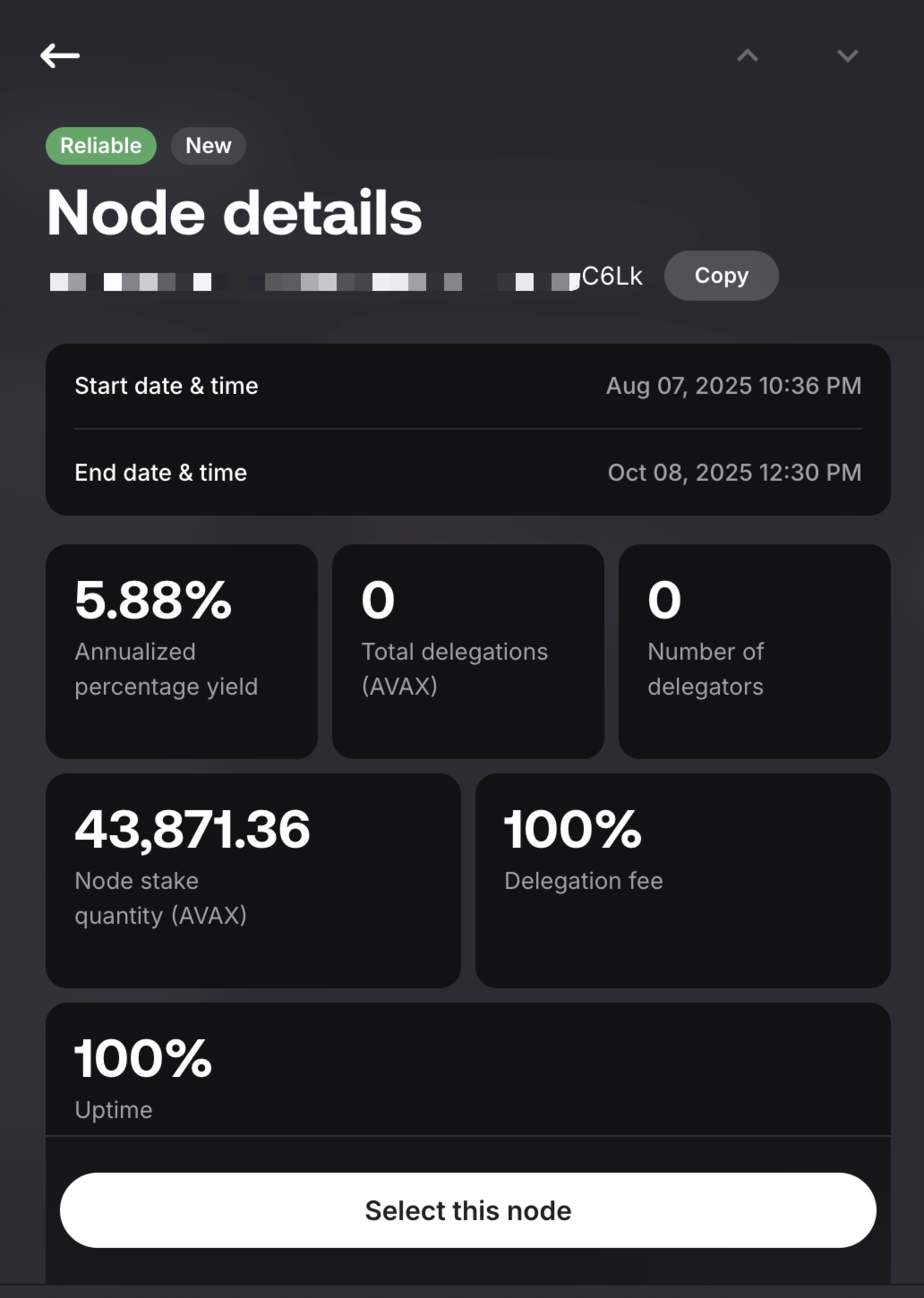
* Under the search bar, enter Node ID provided. (If unsure, please reach out to us)
* Click on the Node and choose "Select this node"

<figure><img src="https://1911902555-files.gitbook.io/~/files/v0/b/gitbook-x-prod.appspot.com/o/spaces%2Fnye3yqpuOzdfrtWAlwng%2Fuploads%2FfUTFYCIixqtC2uctVyBb%2Fimage.png?alt=media&#x26;token=fed6269c-5516-45d4-b55b-8299b825e862" alt=""><figcaption></figcaption></figure>

* You will be able to configure the amount to stake and the duration

<figure><img src="https://1911902555-files.gitbook.io/~/files/v0/b/gitbook-x-prod.appspot.com/o/spaces%2Fnye3yqpuOzdfrtWAlwng%2Fuploads%2FXywB3djqXoZ9ClQiWS2P%2Fimage.png?alt=media&#x26;token=08a2ba9c-7e1a-469b-a315-987cf929a42b" alt=""><figcaption></figcaption></figure>

* Once done, you will be able to review the details before you will be prompt to sign the delegation transaction.

<figure><img src="https://1911902555-files.gitbook.io/~/files/v0/b/gitbook-x-prod.appspot.com/o/spaces%2Fnye3yqpuOzdfrtWAlwng%2Fuploads%2FhOueIIdxrsJnL2wSUqrw%2Fimage.png?alt=media&#x26;token=00f7502d-c1f7-496f-80c8-15d61f209ae1" alt=""><figcaption></figcaption></figure>